Hosting an AI Workshop
Nobody learns to use AI from a slide deck.
The workshop is the step that converts “I’ve heard about it” into “I’ve done it.” Every person on your team builds one small, real thing themselves, and demos it to a room that includes people from outside the team. That’s the whole design.
Total commitment: a one-hour prep meeting, a day and a half, and about three hours of your own planning. The full template has the minute-by-minute agendas, project lists, survey questions, and copy-paste emails — read it here, or print or download it from that page. This is the shape of it.
If you can’t hold a day and a half, read the compressed version instead. Three hours, everyone still builds one thing, everyone still shows it. It’s worth roughly 70% of the full workshop for about 20% of the calendar cost, and it is emphatically better than a day and a half that keeps moving to next quarter. Plenty of managers of 5–30 people cannot get that much of everyone’s time, and pretending otherwise is how this step gets skipped entirely.
What you’re actually trying to accomplish
Write down two or three outcomes before you plan anything. Good ones:
- Every participant demos something they built.
- Every participant has used the tool on real work.
- The team produces a shared list of prompts that worked.
- Measurable lift in self-reported comfort with AI.
Bad ones, which sound good and aren’t: “the team learns about AI,” “we evaluate AI tools,” “we identify AI opportunities.” Those produce a document. You want working artifacts.
Three weeks out
Two things actually slip, so start them early: licenses (procurement and security review take weeks) and written data rules from security, legal, or IT. If you haven’t already sent the request for those rules, send it today — getting the yes is the how, and the usual reason this item slips isn’t a refusal, it’s an unanswered email.
Then: block the day and a half as genuine no-meeting time with your sponsor saying out loud that people are excused from their normal queue. Recruit facilitators — one per five or six participants. Invite the showcase guests now, while calendars are still open.
One week out: the kickoff
One hour. One week is deliberate — enough runway to install things and get curious, not so much that the details evaporate.
The agenda: why we’re doing this, the data rules, a live install, the starter project, the project list, and homework.
Do the install live, in the meeting. This is the highest-value thing in the hour, and the whole reason to meet a week ahead: everyone should walk into the workshop with the chosen tools installed and working, so the day is spent building, not setting up. “Install it before the workshop” reliably produces three people on Day 1 morning fighting single sign-on while everyone waits.
Hand out something — never an empty window. People given a blank page mostly write one-line prompts and conclude the tool is mediocre.
Which handout depends on what your company approved.
- On Claude: the starter project — a folder you copy and give to everyone, with working skills for meeting notes, recurring reports, reply drafts, and document briefs; a few slash commands; and context files for your team’s names, terminology, and data rules.
- On anything else — Copilot, Gemini, ChatGPT, which is the common case since the first two arrive bundled with Microsoft 365 and Google Workspace: the prompt recipes. Same jobs, as copy-paste prompts. You lose the automatic context loading; everything else about the workshop is identical.
Either way, the move that matters is the same: fill in your team’s context together, live, on the projector. Five minutes, and it’s the difference between generic output and output that uses your team’s names and terminology. It’s also the clearest possible demonstration of why context matters, which is the main idea people need to leave with. (Do the data rules yourself, before the meeting, from your actual policy.)
Homework: use the tool three times on real work this week, come with a project chosen, and send back the baseline survey.
Choosing projects
Give people a list to react to. A blank page produces either paralysis or a project three times too big. They can propose their own — approval exists to catch scope, not to gatekeep enthusiasm.
A good workshop project is small enough to demo in five minutes, real work the person actually does, repetitive, safe, and buildable in about six hours by one person. That six hours is the real budget once you subtract check-ins and lunch.
The sizing question that works: “what’s the version of this you could finish by lunch?” Build that first, expand if there’s time. A finished small thing demos far better than an unfinished ambitious one.
Day 1
Intro and goals, then a project round-robin — 60 seconds each on what you’re building and what “done by tomorrow” means. Facilitators flag anything too big right there, out loud. Then build, all day, with a wrap-up at the end.
Facilitators circulate every 90 minutes. Don’t ask “how’s it going” — you’ll get “fine” from exactly the people who are stuck. Ask instead:
- Show me what you have working right now.
- What did you last try that didn’t work?
- What will you have running by end of day?
Two failure modes to correct immediately: someone silently stuck for an hour, and someone who has quietly redesigned their project into a quarter-long initiative.
Keep a blockers list visible to the room. Half the entries get solved by someone else reading it.
Day 2: the showcase
A last stretch of building — the brief is “make it demoable,” not “add features” — then demos.
Five minutes each, timed, hard-stopped. This is the part that makes the workshop visible to the rest of the company, and it falls apart if the first three demos run twelve minutes. Each person covers: the problem in one sentence, a live demo of the thing working (not slides), how they built it, and what didn’t work.
That last part is not optional. A showcase where everything worked teaches the audience nothing and quietly implies that the people who struggled did something wrong.
Invite guests — peer teams, adjacent leaders, your sponsor. It builds real pride in the work and it’s the cheapest possible demonstration to the rest of the company that this is worth doing.
Capture it before everyone leaves
Do this in the room, at the retro, while it’s fresh. A doc you promise to write later doesn’t get written.
For each project: what it does, the prompts and setup that worked, what didn’t work and what they tried instead, what they’d do differently, and whether they’ll keep using it.
Then pull the reusable prompts into one shared document. This is the most durable artifact the workshop produces — it outlives every individual project. The cheapest way to start it: merge everyone’s edited copy of whatever you handed out at the kickoff back into a single shared file, so the library begins with a shape rather than as a blank page someone is supposed to fill in.
Everything you need
Most of these come two ways — read the formatted page in your browser, or download the raw file to edit and hand out. The downloads are plain Markdown and ZIPs, not web pages.
Everything
The full bundle: playbook, worked example, one-page policy, approval guide, operating templates, compressed version, workshop guide, prompt recipes, and the starter project.
Start here
Worked example
One invented 14-person team with every template above filled in — the policy, the scoring, the pilot, the verification, the update, and what went wrong. Copy the specificity, not the answers.
One-page policy
Fill-in-the-blank AI use policy. Do this one first — everything else depends on people knowing what is allowed.
Getting the yes
How to get the data rules in writing: who to ask, the email to send, and what to do when nobody replies. Send this before anything else — it has the longest lead time.
Running it
Operating templates
Six fill-in tools: use-case scoring, a data-use decision aid, pilot tracker, output-evaluation checklist, ownership record, and leadership update.
The compressed version
A 30-day plan and a three-hour session, for when you can’t hold a day and a half of calendar. Roughly 70% of the outcome for 20% of the time.
Workshop guide
The full day and a half: timeline, agendas, project lists, surveys, remote/hybrid variant, copy-paste emails.
AI post-mortem worksheet
For the half hour after AI helps produce something wrong: six questions, whether AI was the right tool at all, and one change with an owner. A Word file — fill it in on screen during the meeting.
Hand to your team
Prompt recipes
Copy-paste prompts for whatever assistant your company approved — Copilot, Gemini, ChatGPT. Start here if your team is not on Claude.
Starter project (Claude only)
The folder you copy and hand out at the kickoff — skills, commands, and context files. Needs Claude; on any other assistant use the prompt recipes instead.
The reasoning behind it
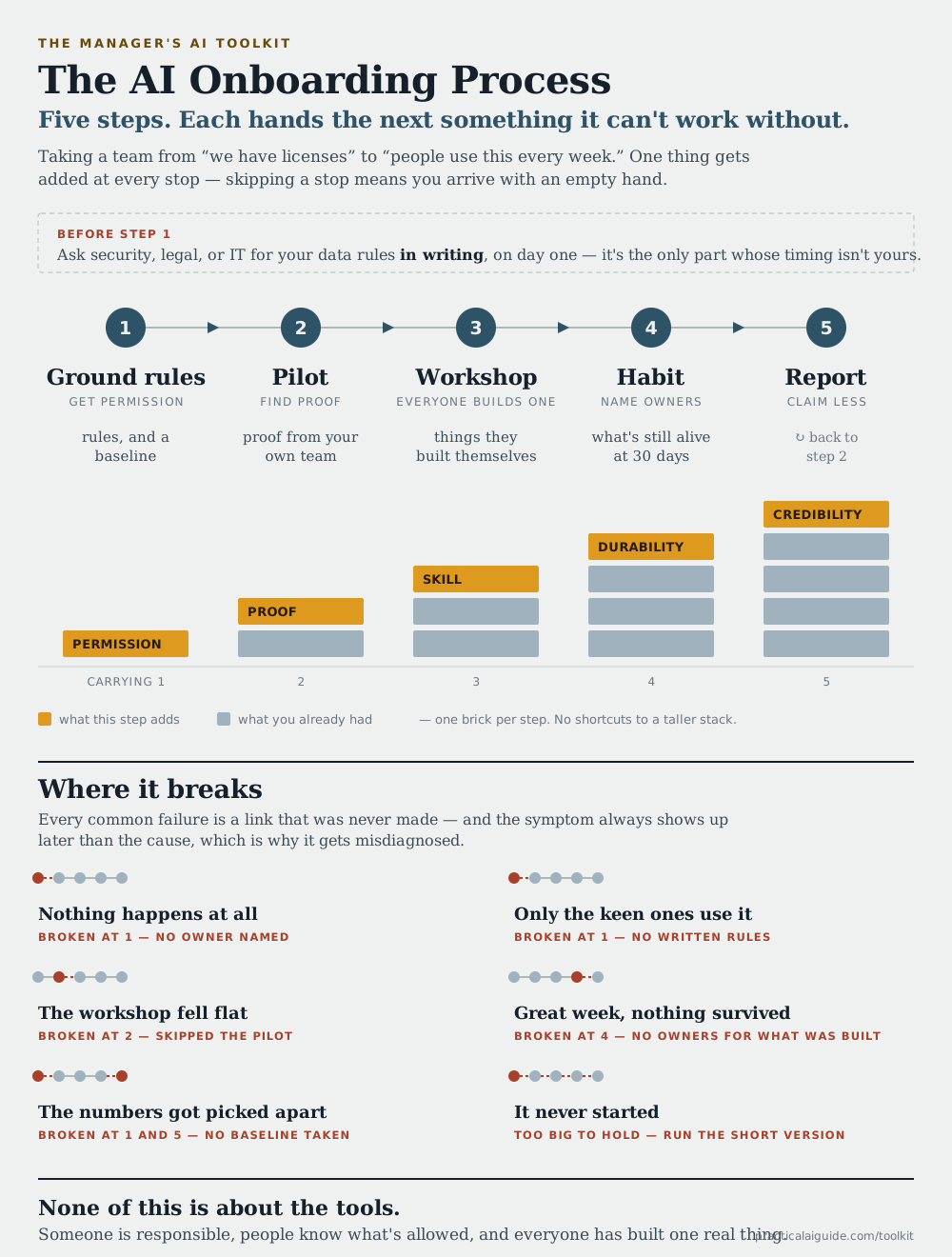
The AI onboarding process (diagram)
The whole sequence as one image — five steps, what each hands the next, and which step each common failure traces back to. Print it, or drop it in a deck.
Full playbook
The whole argument in one document: rollout sequence, policy, use cases, skeptics, ownership, measurement, and a 90-day checklist.
Edit the downloads, cut what doesn't apply, and make them yours — none of it is meant to survive contact with your team unchanged.
Where this goes next
The workshop fails quietly if nothing follows it — that’s the next guide.
The takeaway: a day and a half, and everyone builds one real thing and shows it to someone outside the team. The demo is what makes it count — for the people who built something, and for everyone watching who now knows it’s possible.