Toolkit
The Manager's AI Toolkit
Everything you need to take a team from "we have licenses" to "people use this every week."
Written for the manager of a team of roughly 5–30 people who has been handed AI tools and is now responsible for something happening. No technical background assumed.
The order of operations
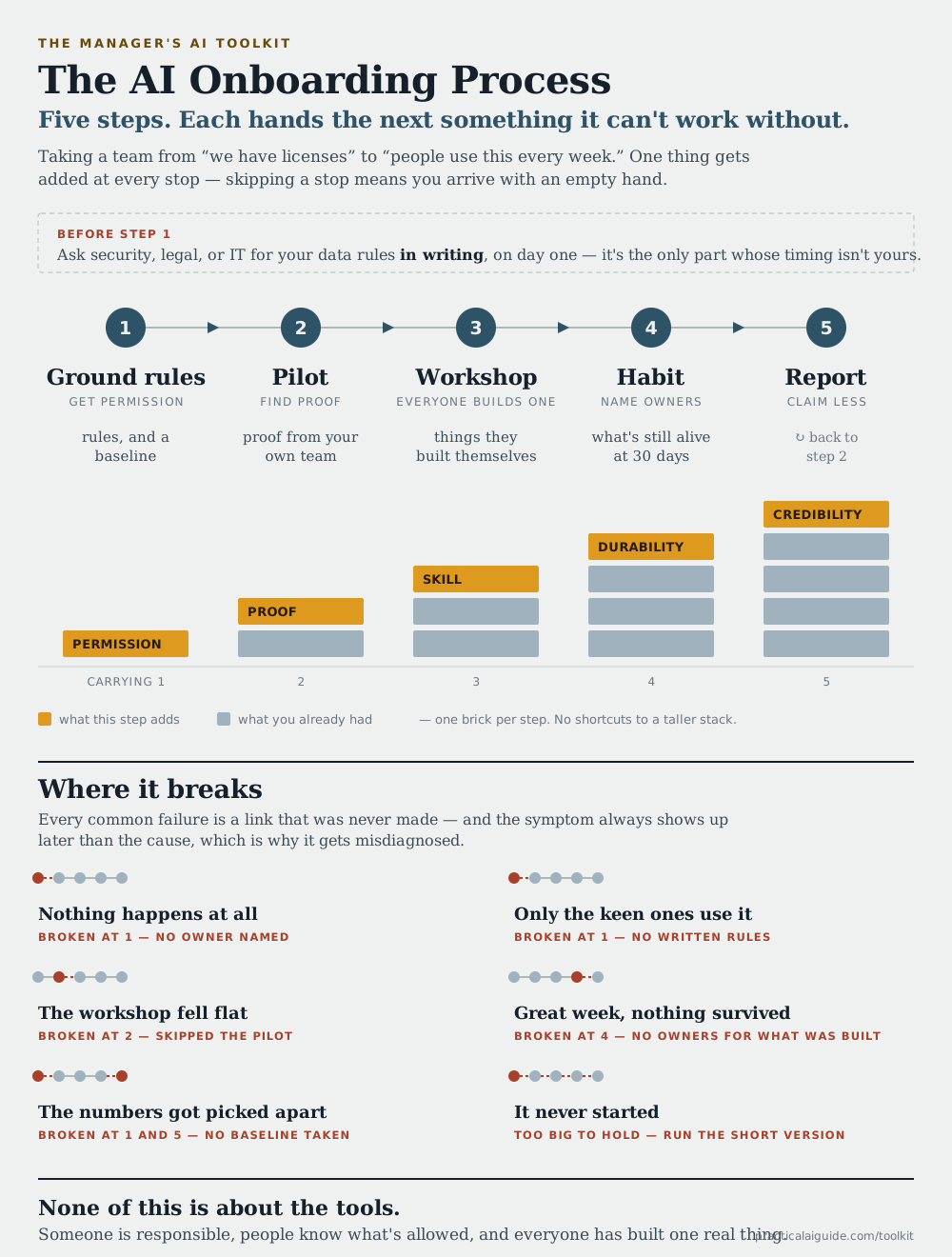
Five steps. The order is the part that matters, and the reason for it runs down the middle: each step hands the next one something it can't work without. Run the workshop before the pilot and you walk into the room with no examples from your own team. Skip the baseline in step one and step five has nothing to compare against.
The AI Onboarding Process, on one page →The whole sequence as a single image. Print it, pin it up, or drop it in a deck.
Before step one
Ask security, legal, or IT for your data rules in writing. Send it the day you start — every other step here is under your control and this one isn't. Getting the yes →
Ground rules
Nobody experiments freely while they’re guessing at what’s allowed. This is the step everything else waits on.
You come out with
- Written data rules you can quote, not guess at
- One named owner, with protected hours
- A baseline — you can’t recreate one later
- The one-page policy, published where people work
carries forwardRules people can state from memory, and a baseline to measure against
Pilot
Two or three people, not the team — and they needn’t even be on it. Not to prove AI works, but to come out holding real before-and-after examples, which is what makes the workshop land.
You come out with
- Two or three workflows that demonstrably work
- Before-and-after numbers from the people who do the work
- The failure modes you’ll warn the room about
Running a pilot · Scoring sheet + pilot tracker · A scored + tracked pilot
carries forwardThree or four examples from your own team. This is what makes the room turn up
Workshop
Converts "I’ve heard about it" into "I’ve done it." A one-hour kickoff a week ahead gets the whole team installed and using it — then everyone builds one real thing themselves and shows it.
You come out with
- One thing built, per person, by them
- A prompt library that starts with a shape, not a blank page
- A showcase people outside the team actually saw
Hosting a workshop · Workshop template · The compressed version
carries forwardThings your team built themselves — which is what there is to maintain
Habit
This is where it’s actually decided. A workshop with nothing after it becomes a story about a fun week in the spring.
You come out with
- An owner named for everything still in use
- Outputs somebody has actually checked
- Usage that’s boring and unremarked
carries forwardThe count of what’s still in real use — the number that survives scrutiny
Report
An honest write-up for whoever paid for the licenses — specific enough to check, which is what makes the next ask credible.
You come out with
- An update specific enough for anyone to check
- One clear ask, made credible by the rest
Then go round again with the next two use cases from your scoring sheet. Two short rounds beat one long programme, because each one ends in something real and neither is ever the thing that gets canceled when the quarter gets busy.
Go as fast as you can hold — there's no minimum duration here. Each step ends in something real, so getting through all five in a month is doing this properly rather than cutting corners, and the compressed version is that month written out at about four hours of your team's time.
The four guides
The steps above are what you do. These are the reasoning behind them, written to be read in order.
- How to Use This Toolkit
The five-step order of operations, what's in the toolkit, and the mistakes that make the whole thing fail. Start here.
- Setting the Ground Rules
Licenses are not adoption. The first step: naming one owner, getting your data rules in writing from the people who own that decision, and publishing a policy short enough that people read it.
- Running a Small Pilot
Two or three people — not the team, and not necessarily even on it. A few weeks of finding out whether a workflow is amenable, so you walk into the workshop holding a real before-and-after instead of a vendor demo.
- Hosting an AI Workshop
A day and a half where everyone on your team builds one real thing and demos it. Agendas, project selection, the starter project, and the showcase that makes it visible.
- Making It Stick
The part after the workshop: naming owners for what survives, measuring honestly, handling skeptics and over-enthusiasts, and your own visible AI use.
Not starting at step one?
Most people don't. Find the row that describes your week and start there instead — the sequence will still be waiting.
- Licenses landed, nothing has happened, and it is now your problem
- Onboarding your team
- Nobody will tell you what data your team is allowed to paste in
- Getting the yes
- You need this done in a month, or you can’t hold much of anyone’s calendar
- The compressed version
- The workshop already happened and none of it survived
- Making it stick
- Someone above you wants to see something by the end of the month
- Operating templates
- Your team is on Copilot, Gemini, or ChatGPT rather than Claude
- Prompt recipes
- You want to see what all of this looks like finished, first
- The worked example
- You’d rather read the whole argument in one document
- The full playbook
Take it with you
The guides are the readable version. These are the working documents — the ones you fill in, hand out, and edit for your own team.
Most of these come two ways — read the formatted page in your browser, or download the raw file to edit and hand out. The downloads are plain Markdown and ZIPs, not web pages.
Everything
The full bundle: playbook, worked example, one-page policy, approval guide, operating templates, compressed version, workshop guide, prompt recipes, and the starter project.
Start here
Worked example
One invented 14-person team with every template above filled in — the policy, the scoring, the pilot, the verification, the update, and what went wrong. Copy the specificity, not the answers.
One-page policy
Fill-in-the-blank AI use policy. Do this one first — everything else depends on people knowing what is allowed.
Getting the yes
How to get the data rules in writing: who to ask, the email to send, and what to do when nobody replies. Send this before anything else — it has the longest lead time.
Running it
Operating templates
Six fill-in tools: use-case scoring, a data-use decision aid, pilot tracker, output-evaluation checklist, ownership record, and leadership update.
The compressed version
A 30-day plan and a three-hour session, for when you can’t hold a day and a half of calendar. Roughly 70% of the outcome for 20% of the time.
Workshop guide
The full day and a half: timeline, agendas, project lists, surveys, remote/hybrid variant, copy-paste emails.
AI post-mortem worksheet
For the half hour after AI helps produce something wrong: six questions, whether AI was the right tool at all, and one change with an owner. A Word file — fill it in on screen during the meeting.
Hand to your team
Prompt recipes
Copy-paste prompts for whatever assistant your company approved — Copilot, Gemini, ChatGPT. Start here if your team is not on Claude.
Starter project (Claude only)
The folder you copy and hand out at the kickoff — skills, commands, and context files. Needs Claude; on any other assistant use the prompt recipes instead.
The reasoning behind it
The AI onboarding process (diagram)
The whole sequence as one image — five steps, what each hands the next, and which step each common failure traces back to. Print it, or drop it in a deck.
Full playbook
The whole argument in one document: rollout sequence, policy, use cases, skeptics, ownership, measurement, and a 90-day checklist.
Edit the downloads, cut what doesn't apply, and make them yours — none of it is meant to survive contact with your team unchanged.