The AI Onboarding Process
Five steps. Each hands the next something it can't work without.
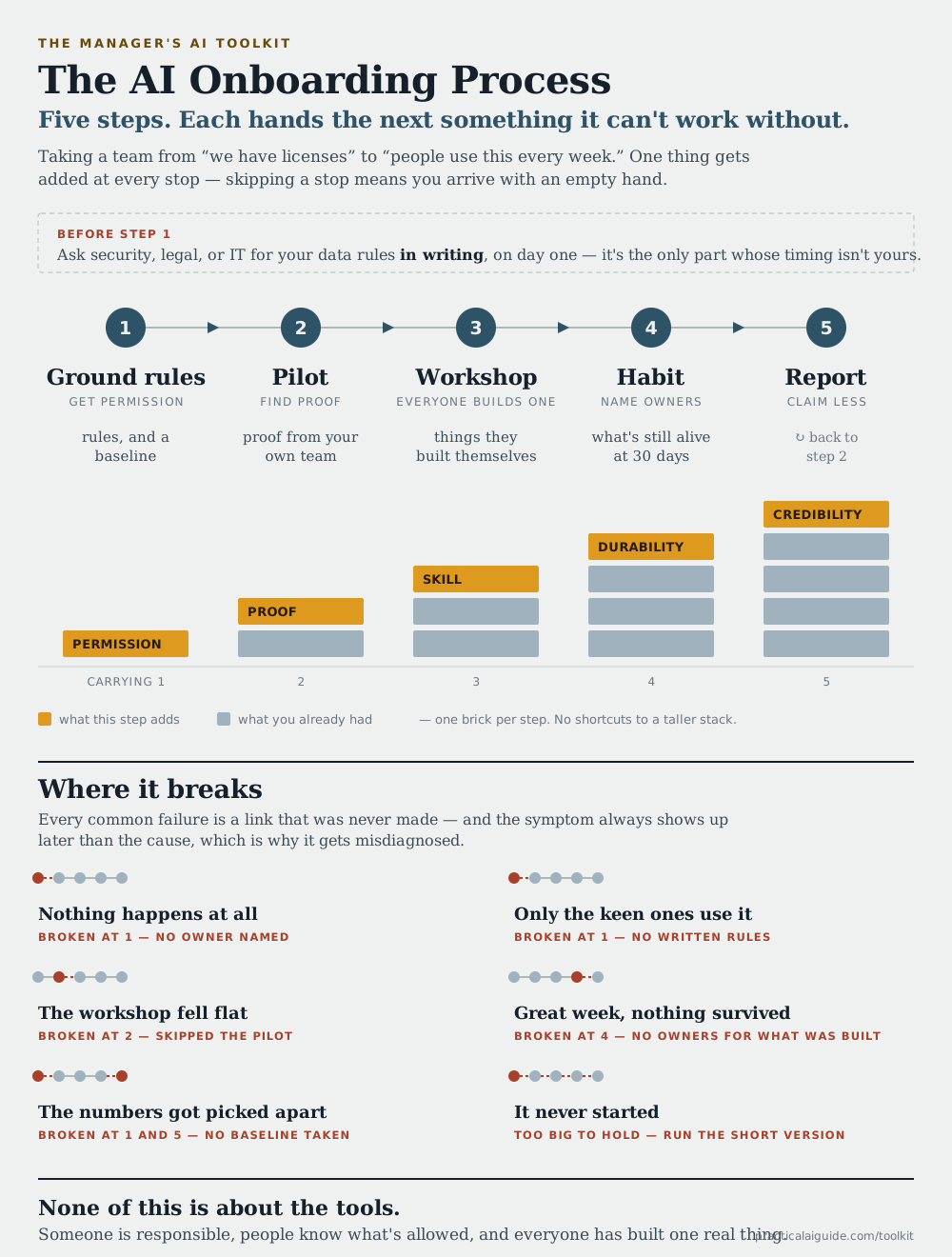
For a manager whose team has been handed AI tools: how to get from “we have licenses” to “people use this every week.” Watch the stack in the middle — one thing gets added at every step, so skipping a step doesn't save you time, it just means you arrive with less in your hands.
Why the order is the order
Run the workshop before the pilot and you walk in with nothing from your own team, so you fall back on a vendor demo — which convinces nobody. Skip the baseline in step one and step five has nothing to compare against, and no amount of later effort recovers it. The arrows aren't decoration; they're the dependency.
Step two is not a pilot of your team. It's a pilot of the use case. You're finding out whether a workflow is amenable and what the before-and-after actually is, sitting next to two or three people while they do it. Nobody needs to be skilled at this yet — that's what step three is for.
There are no week numbers on the diagram, deliberately. Go as fast as you can hold. Each step ends in something real, so getting through all five in a month is doing this properly rather than cutting corners — the compressed version is that month written out. The one thing you can't speed up is the gate above step one, because it depends on somebody else replying to you.
Where it breaks, in words
The diagram gives each failure a headline and a broken link. Here's the rest of it — and note that in every case the symptom shows up later than the cause, which is why these get misdiagnosed as the wrong step's problem.
- Nothing happens at allBroken at 1 — no owner named
- Adoption belonged to everybody, so it belonged to nobody. Name one person with about two hours a week that are actually protected.
- Only the keen ones use itBroken at 1 — no written rules
- The cautious majority quietly opted out rather than guess at what was allowed. Usually nobody refused you — a request just went unanswered, and nobody chased it.
- The workshop fell flatBroken at 2 — the pilot was skipped
- You walked into the room with no examples from your own team, so you were left demonstrating somebody else’s software. The room needed to see a colleague’s Friday report get faster, not a vendor video.
- Great week, nothing survivedBroken at 4 — no owners for what was built
- Everything got demoed and then rotted, because keeping it working was nobody’s job by the following quarter. The fix costs two minutes per thing: write down who owns it and what breaks without it.
- The numbers got picked apartBroken at 1 and 5 — no baseline
- Either there was nothing to compare against, or the claim was bigger than what you actually measured. The first number someone checks and finds soft discredits every other number you reported.
- It never startedToo big to hold
- A day and a half got booked, then moved, then moved again. Three hours that happen beat a day and a half that doesn’t — that’s what the compressed version is for.