How to Check AI's Work: You're Looking for the Wrong Mistake
Two numbers that can’t both describe the same behavior.
Workday asked 3,200 leaders and employees about AI at work. Among daily users, 77% said they review AI-generated work just as carefully as work done by a human, if not more. In the same research, 37% of the time AI saved was going straight back out again into correcting, clarifying and rewriting what it produced.
So: nearly everyone is checking, and roughly four hours in every ten saved still gets eaten by fixing things. That isn’t a story about lazy people. It’s a story about checking for the wrong mistake.
The error you’re braced for isn’t the one getting through
Resume.org surveyed 1,146 US managers who each have at least one direct report. 70% had seen an AI-related error from someone on their team in the past year: 43% “several times,” 12% “many times.”
The interesting part is what those errors were. Among managers who saw them:
| Type of error | Managers reporting it |
|---|---|
| Factual inaccuracies | 58% |
| Failed to account for critical context | 51% |
| Low-quality content | 41% |
| Poor recommendations | 35% |
| Confidentiality, privacy or compliance problems | 29% |
Everyone knows about the first row. We’ve all been told to watch for When a model states something untrue with the same confidence it states something true. It isn’t lying. It has no concept of truth, only of what text plausibly comes next. , and a made-up statistic or a citation that doesn’t exist is at least findable. You can look it up.
The second row is the problem. A context failure produces output that is technically correct and still wrong, because the model didn’t know the the full context. I see this in my day job where a component functions as requested, but doesn’t use the standardized code libraries because it didn’t know where this component would be used. Looks fine on the page, but makes the codebase inconsistent and a future maintenance nightmare. AI won’t catch this error on its own because nothing on the page looks off. There’s nothing to look up.
Why reading it through doesn’t catch anything
Here’s the uncomfortable mechanic. AI output is Smooth, well-formed, confident prose. Fluency is what these models optimize for, and it’s the quality humans use as a shortcut for competence, which is why the output is disarming in a way a clumsy human draft never is. , and we read fluent text faster and more trustingly than clumsy text. A colleague’s rough draft makes you slow down. A polished paragraph does the opposite.
So “read it over before you send it”, which is what most people mean by checking, is a process almost perfectly designed to miss the errors that matter. You skim smooth prose, find nothing jarring, and ship it.
Three specific checks beat one general read-through.
Check 1: Find the load-bearing claims
Don’t check the document. Check the two or three The statements someone will actually act on, or that everything else in the document rests on. A report might have forty sentences and three that matter: the number in the recommendation, the deadline, and the reason. in it. The statements that someone could act on need to be correct.
Read what you’re about to send and ask: if this sentence were wrong, would anyone do anything differently? Most sentences fail that test: they’re connective tissue, and a wobble there costs nothing. Mark the two or three that pass, and check those properly: open the source, recompute the number, confirm the date.
This takes about two minutes and catches most of row one.
Check 2: Ask what it couldn’t have known
This is the what 51% of people don’t do, and it can surface valuable context.
Before you accept the output, ask yourself: what do I know about this situation that wasn’t in what I gave it? The history, the politics, the thing that happened on Tuesday, the reason this policy exists, the person who will read it.
The model produced a reasonable answer for a generic version of your situation, because a generic version is all it had. Every gap between that and your actual situation is an error waiting to happen, and it’s invisible on the page, because the text is internally consistent. The only person who can catch it is you, and only by deliberately asking.
If you find a gap, that’s usually a signal to give the model the missing context and regenerate, not to patch the output by hand.
Check 3: Recompute exactly one thing
Pick a single number or quotation and verify it from the source. Not all of them: one, chosen at random.
This is a spot check, and it works the way spot checks work: it doesn’t prove the rest is right, it tells you whether this output is trustworthy in general. If the one number you pick is wrong, stop trusting the whole thing and check it properly. If it’s right, you’ve earned some confidence about the rest at a cost of thirty seconds.
Can a second AI check the first one?
Partly, and it fails in exactly the place you most need it, which is worth understanding before you rely on it.
The technique is simple. Paste the output into a different model and ask it to find problems. A second model brings different training data and different failure modes, and, the part that actually matters, no commitment to the answer, because it didn’t write it. Asking a model to review its own work tends to produce a defense of it.
Two rules separate this working from it being theatre.
Give it a task it can fail, not a verdict it can agree with. Don’t ask “is this correct?” Models lean hard toward agreement: a Stanford-led study across eleven leading models found they affirm users’ actions about 50% more often than humans do. Ask instead: “List every factual claim in this document. For each, tell me whether you can verify it, and flag any you believe are wrong.” That returns a list you can work through, rather than a reassurance you can’t use.
Give it the source, not just the output. A model checking a summary against nothing is guessing. A model checking a summary against the document it was drawn from is doing real work.
Here is all three run on a sentence I nearly published in an earlier post on this site, and what each one caught.
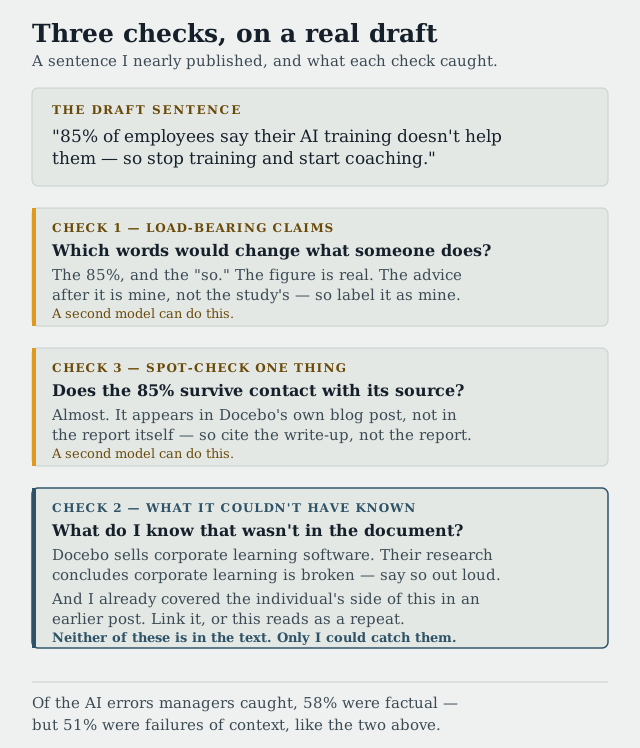
Both catches in the bottom panel are context, not fact. Nothing in the draft is untrue, and a second model would have passed it.
The second model doesn’t know your context either. It cannot catch that the client canceled, that the figure is net rather than gross, or that this person has already said no twice: for precisely the same reason the first model couldn’t. Nobody wrote it down.
So use it, but know what you’re buying: a second model is a fast, cheap way to do checks 1 and 3, and no help at all with check 2.
Scale the check to what it costs to be wrong
Not everything deserves three checks. The honest rule is to spend checking time in proportion to consequence, and the Resume.org data gives a sense of what consequence looks like: 59% of managers had to spend their own time fixing these errors, 28% reported lost credibility or brand damage, 19% reported costs over $10,000, and 5% over $50,000.
So: an internal summary nobody will act on gets a skim. Anything leaving the building, going to a customer, or feeding a decision gets all three checks. Anything involving money, law, or a person’s employment gets all three plus a second pair of eyes.
That last category is worth being blunt about. If the cost of being wrong is somebody’s job or a legal exposure, “I checked it” isn’t a control. Someone who didn’t produce it needs to look.
The takeaway
The checking most people do, reading it over to see if it looks right, is tuned for the wrong failure. It catches clumsiness, and AI is never clumsy.
Replace it with three questions that take about five minutes: which claims here would change what someone does, what do I know that the model didn’t, and does one randomly chosen number survive contact with its source?
The middle one is the one to keep if you only keep one. Made-up facts are embarrassing and findable. Confidently missing context is the error that gets all the way to the customer.
Sources: the 77% and 37% figures are from Workday’s Beyond Productivity: AI Value report with Hanover Research (3,200 respondents, half leaders and half employees, fielded November 2025), reported by CFO.com (opens in a new tab). Workday sells AI-featured HR software, so it has an interest in how organizations frame this. The manager figures are from Resume.org’s “AI Slop Crisis” survey (opens in a new tab) (1,146 US managers with at least one direct report, fielded via Pollfish in January 2026); a related Resume Now survey (opens in a new tab) of 1,012 employed US adults (Pollfish, December 2025) found 35% rarely or only occasionally review AI output before using it. Both are resume-industry panel surveys rather than academic research: the numbers are directionally useful, not precise. The sycophancy figure is from Cheng, Lee, Khadpe, Yu, Han and Jurafsky, “Sycophantic AI decreases prosocial intentions and promotes dependence” (opens in a new tab) (Science; eleven models tested). The paper is paywalled, so I took the figure from Tech Policy Press’s summary (opens in a new tab) rather than the original. It measures affirmation of a user’s stated actions, not document review; applying it to “don’t ask a model whether its own answer is right” is my extension, not the authors’. The three checks are mine.
Related: Workslop: The Polished Report That Wastes Everyone’s Time is the other side of this, what to do when someone sends you the unchecked output. Why AI Doesn’t Always Save Time, and How to Tell When It Will is where that 37% goes, and how to predict which tasks will lose it.